Chapter 13
When the Gap Closes
When a planned runway gap disappears, local control must cancel a takeoff, stop a rolling departure or send an arrival around before an incursion happens.
In chapters 11 and 12 you learned how to fit a departure into a gap on final and clear an arrival to land once the pavement ahead is empty. Most of the time the departure rolls on schedule, lifts off and leaves a clean runway before the inbound flight reaches its decision window. This chapter covers what you do when that gap disappears. A departure crew takes thirty extra seconds on the centre line, a tailwind pushes the arrival faster across the ground, or a truck stays on the pavement longer than planned.
Order of options when a gap fails
Local controlThe tower position that owns the active runway and the sky immediately around it; Tower on the radio. Every use of the runway happens on its say-so.Open in the glossary has three tools to break a closing runway conflict: cancelling the takeoff clearance before the roll builds, stopping a departure that has already started rolling, and sending the arrival around. All three are direct instructions, and the choice depends on what is on the runway and what is still slow or in the air.
Your first choice is to hold the aircraft that is stationary or barely moving. If you clear a departure for takeoff and see that it is slow to advance the thrust levers while the arrival on final closes, cancel the takeoff clearance before the aircraft builds speed. At that stage the crew keeps the thrust levers at idle and stays in place or taxis off at the nearest exit.
If the departure has already started its roll and a vehicle or crossing aircraft enters the runway ahead of it, instruct the crew to stop immediately. Early in the ground roll, the crew can bring the thrust levers to idle, apply maximum braking and stop on the remaining pavement. Once the aircraft accelerates through decision speed and rotates, that option disappears. You cannot stop an aircraft that has lifted its nose wheel.
The option that stays available longest is sending the arrival around. An aircraft on final is already flying with its engines spooled up and can arrest its descent in a few seconds once the crew applies go-around thrust. You can command a go-around from three miles out, at the decision window, or over the threshold before touchdown. When a departure is rolling down a clear runway and an arrival is closing behind it on short final, let the rolling departure continue and send the flying aircraft around. Stop a rolling departure only when an obstruction is ahead of it on the surface or when it is slow enough to abort and VacateLeave the runway. An aircraft is clear of the runway once all of it is past the holding position marking, and the pilot is the one who determines it.Open in the glossary with room to spare.
Sending an arrival around
When an arrival's gap closes and the runway will not be empty before the threshold, command a go-around. Issue the instruction without waiting, and add the reason when frequency time allows.
United Four Four Seven, go around.
Going around, United Four Four Seven.
United Four Four Seven, contact Bayview Departure one two four point six.
One two four point six, United Four Four Seven.
In the cockpit, a go-around demands both pilots' attention for the first few seconds. The pilot flying advances the thrust levers to go-around power, pitches up to climb attitude and calls for flaps to be retracted one step. With a positive rate of climb, the pilot monitoring raises the landing gear, checks the missed-approach altitude and reads back your call. Because cockpit workload peaks during that transition, keep your initial transmission short. Once the aircraft is climbing away from the runway, issue any required heading or altitude and transfer the flight to departure or approach control.
A go-around costs the operation a missed approach for approach control to separate and a new slot in the sequence; send it without waiting for the departure to clear.
A separate rule applies when an arrival on final appears to have broken a regulation, such as entering your airspace late or flying below a published altitude. You do not withhold a landing clearance as a penalty.
Do not withhold a landing clearance indefinitely even though it appears a violation of Title 14 of the Code of Federal Regulations has been committed. The apparent violation might be the result of an emergency situation. In any event, assist the pilot to the extent possible.
If the runway is clear, clear the aircraft to land and handle administrative reporting after it is on the taxiway. Apparent non-compliance may stem from an electrical failure, a stuck microphone or an unannounced emergency.
Stopping a departure on the roll
Chapter 11 introduced cancelling a takeoff clearance when an aircraft is still stationary or just starting to move. You state the callsign, cancel the clearance and give the reason.
Delta Two Zero Two, cancel takeoff clearance, vehicle on the runway.
Holding position, Delta Two Zero Two.
When a departure is already accelerating down the runway and a conflict appears ahead, you need the crew to abort the roll at once. Three stop phrases appear in air traffic practice: "stop immediately" is the international standard phrase for aborting a takeoff roll, "hold position" is the phrase in the FAA manual's taxi rules, and "stop stop stop" is the emergency form used on operational frequencies to cut through cockpit noise. Issue the call the moment you see the conflict.
JetBlue Eight One, stop immediately.
Stopping, JetBlue Eight One.
JetBlue Eight One, turn left next taxiway, contact ground.
Left next taxiway, contact ground, JetBlue Eight One.
A rejected takeoff leaves an aircraft stopped part-way down the active runway with hot brakes while arrivals on final continue to close. The crew will stay stopped on the centre line and wait for your instruction on how to leave the runway.
Leaving a runway requires a specific instruction from local control, and you choose the exit. If a turnoff lies ahead, instruct the crew to exit there and contact ground once clear. If the nearest usable exit is behind the aircraft, instruct it to back-taxi along the runway to reach that turnoff. Until the tail crosses the hold-short markings, the runway remains occupied, so any arrival that reaches the decision window before the stopped jet vacates must be sent around.
Preventing and breaking a runway incursion
In the FAA's definition, a Runway incursionAnything on protected runway surface that should not be there: an aircraft past its hold line, a vehicle without approval. The accident category towers exist to prevent.Open in the glossary is any occurrence at an airport involving the incorrect presence of an aircraft, vehicle or person on the protected area of a surface designated for landing and takeoff. That protected area begins at the runway holding position markings across each connecting taxiway.
A tower controller can cause a runway incursion in three ways:
- Clearing an aircraft onto a runway that is not free of other traffic or vehicles.
- Missing an incorrect ReadbackThe pilot repeating a clearance or instruction back so the controller can verify it was received correctly.Open in the glossary when a pilot or driver repeats a hold-short instruction as a crossing clearance.
- Forgetting an aircraft holding in position or a vehicle already authorised onto the pavement.
The manual requires the controller to verify that the surface is clear before any takeoff or landing.
Ensure that the runway to be used is free of all known ground vehicles, equipment, and personnel before a departing aircraft starts takeoff or a landing aircraft crosses the runway threshold.
note"PROCEED AS REQUESTED" is not approved phraseology for instructing aircraft, vehicles, equipment, or personnel to cross or operate on a runway.
Airport vehicles often call with conversational requests to inspect lights or sweep an intersection. Answering "proceed as requested" leaves it ambiguous which runway edges the driver may cross. Every movement onto or across a runway requires an explicit runway and instruction.
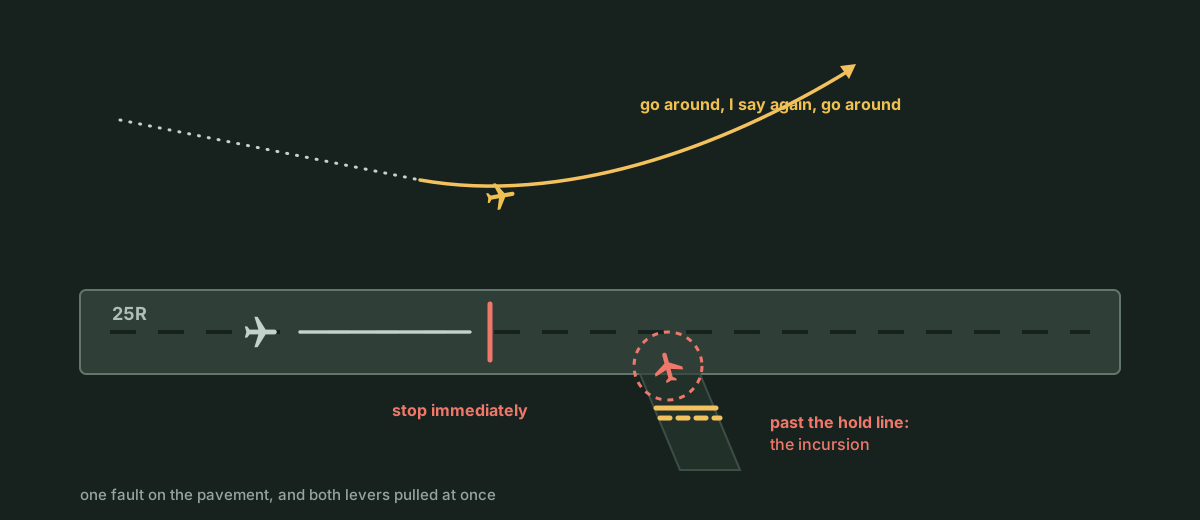
When an incursion develops while a departure is starting its roll and an arrival is on short final, break both ends of the conflict in order of urgency. First stop the aircraft on the surface ("stop immediately" or "stop stop stop"), then send the arrival around ("Go aroundGo around, I say again, go around.An instruction or pilot decision to abandon the approach and climb straight ahead or on the missed approach, after which the aircraft is re-sequenced.Open in the glossary"). Once a conflict on the taxiways is resolved, release a held aircraft with "continue taxiing".
Pilots look out the window too, and a crew who sees traffic on the centre line may refuse a takeoff clearance or initiate a go-around without waiting for your instruction. Never count on a pilot's lookout to catch a bad clearance. From a low cockpit looking down two miles of flat concrete into glare, rain or night lighting, a truck or aircraft at the midpoint blends into the background while both pilots have much of their scan inside the flight deck. You are responsible for the runway, so check it is empty before every clearance.
Using the tower radar display
In clear weather, your primary tool for checking the runway is a visual scan out the cab windows from threshold to rollout end. Towers also mount radar displays in the cab to show traffic on final and on the surface. How you may use those displays depends on whether the equipment is certified.
Uncertified tower display workstations must be used only as an aid to assist controllers in visually locating aircraft or in determining their spatial relationship to known geographical points. Radar services and traffic advisories are not to be provided using uncertified tower display workstations.
A certified tower radar display allows local control to determine an aircraft's identification, exact location or spatial relationship to other aircraft, to issue radar traffic advisories, and to give instructions to aircraft within the surface area. Even so, visual separation procedures do not change. Local controllers at non-approach-control towers must spend the majority of their time scanning the runways and local area, so the display supplements the visual scan and pilots are not told they are in "Radar contactAmerican Two One Five, radar contact.I have identified you on my display and will provide radar flight following. Said when identification is established, and the pilot can stop making position reports.Open in the glossary".
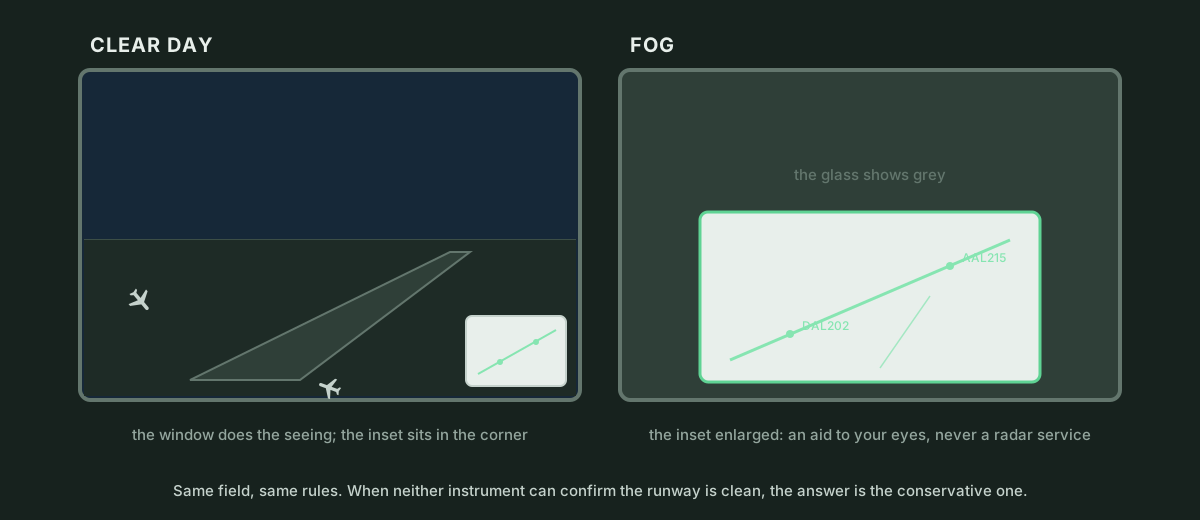
Surface detection equipment (ASDE) and ground radar displays become essential at night and in fog, rain or snow. When low visibility hides the far end of the runway, surface radar tracks aircraft and vehicles on the movement area with position symbols and labels so you can confirm the pavement is clear before issuing a clearance.
In the Sim
In ATC Simulator the same three instructions are available: go around, cancel takeoff clearance and stop. To send an arrival around, the standard command is "go around"; the longer phrase "go around, I Say againSay again for American Two One Five.Used instead of the military term 'repeat', this asks the other party to repeat their entire last transmission when it was broken or unclear.Open in the glossary, go around" is also understood, though it is not the standard form. The pilot reads back "going around" and flies the missed approach. An aircraft that is not on an approach, such as a departure or an arrival that has already landed, refuses a go-around with "we are not on an approach". A commanded go-around costs 30 points when your sequence or clearance caused the conflict, whereas a go-around that nobody could have prevented costs nothing.
To withdraw a takeoff clearance before the aircraft is committed, the standard phrase is "cancel takeoff clearance, vehicle on the runway" (a reason is part of the standard form; "cancel takeoff clearance" alone is also accepted). The pilot reads back "holding position". To stop a rolling departure, "stop immediately", "stop stop stop" and "hold position" are all standard phrases. A departure on its takeoff roll brakes to a halt on the runway and stays there; it never moves on its own and calls again every thirty seconds asking for taxi instructions until you issue a vacate or taxi clearance. A departure that has already rotated, or an arrival still flying on final, refuses a stop command with "UnableUnable.A pilot says this when an instruction is unsafe or beyond the aircraft's capability, requiring a new clearance from you.Open in the glossary, we are airborne".
A stopped departure leaves the runway on your instruction, such as "turn left next taxiway, contact ground", or by naming a specific taxiway; if the assigned exit is behind the aircraft, it back-taxis along the runway to reach it. On the taxiways, "continue taxiing" releases an aircraft that was previously told to hold position.
Clearing an aircraft onto or over an occupied runway, or clearing landing traffic to land inside about two nautical miles while the runway is still occupied, raises a runway incursion alert. It costs 100 points and counts as a strike, like a separation violation; the third strike ends the shift. Lining a departure up behind traffic that is leaving the runway is legal and is not an incursion.
Pilots in the sim have eyes too. With a chance that depends on the difficulty tier (none in the tutorial, 80 percent on beginner, 55 percent on advanced and 30 percent on expert), a departure at the hold bar refuses a line-up or takeoff clearance with "unable: traffic on the runway", and an arrival holding a landing clearance goes around by itself when the runway is still occupied inside about six tenths of a mile. Their visual lookout fades with distance and low visibility. A vehicle on the runway pavement makes an arrival inside a mile go around with "vehicle on the runway". The alert still fires when the pilot does not catch the mistake first.
The tower seat includes a ground radar inset with three sizes: closed, small and expanded. It opens to the expanded size automatically when visibility drops below three statute miles or at night, unless you have chosen a size manually. It shows aircraft with labels and tints any aircraft involved in a runway incursion alert. You practise these tools in training lesson 16, "When the gap closes", which is designed to go wrong: a departure Cleared for takeoffRunway two five right, wind two five zero at eight, cleared for takeoff.The runway is yours to fly from. Runway number first, then the wind, then the clearance, always in that order.Open in the glossary with an arrival on a six-mile final, a commanded go-around, a second departure whose takeoff clearance is cancelled on its roll, the vacate, and a landing clearance issued only once the runway is empty. A tower in service coordinates with other positions by interphone and relies on facility-specific surface equipment; the sim keeps the action on your frequency and gives every tower seat one ground radar inset.