Chapter 04
Understanding Arrivals
Learn how arrivals enter your sector on a STAR, how altitude restrictions work, what you owe on initial contact, and how to amend a route.
Before the aircraft calls you
Every arrival you work starts with a flight plan filed before the aircraft leaves its departure gate. That plan lists the callsign, aircraft type, origin airport, cruising altitude, route of flight, and destination. After takeoff, the departure controller hands the flight to an en route centre, which guides it along high-altitude airways toward its destination.
As the flight gets within roughly a hundred miles of the field, the overlying centre begins preparing it for terminal airspace. Above Bayview International, that facility is Cascade Center. To organise inbound traffic coming from every compass direction, Cascade Center assigns a published arrival procedure that channels aircraft toward a few known entry fixes and starts them down out of the flight levels.
Centre and Approach coordinate that traffic flow under a standing agreement between the facilities. Each arrival stream is handed off near an agreed fix and altitude. By the time Cascade Center transfers communication and the pilot calls you on one two four point six, the aircraft is already established on an arrival route and descending toward your sector.
Before you answer that call, read the aircraft's intent off the radar scope and its data block. The callsign tells you who is calling. The altitude readout and trend arrow show the altitude the flight is passing and whether it is level or descending. The groundspeed shows how fast it is moving across the ground, and when you select the aircraft, the clearance and airport lines show the route and clearance the pilot believes is in effect alongside the origin and destination.
What a STAR is and why airports publish them
If you need to know what is a STAR in air traffic control, the acronym stands for Standard Terminal Arrival Route. A STAR is a charted route made of a series of named fixes, usually paired with altitude restrictions and sometimes speed limits, that brings arrivals from the en route structure to a fix near the terminal area.
Airports publish STARs so pilots and controllers share a predictable plan before the aircraft enters busy terminal airspace. Funnelling arrivals from different directions onto a few charted paths keeps descending traffic clear of departure climbs and terrain. It also cuts down on radio talk because the pilot and controller both know the route without reading out a string of individual waypoints.
An arrival clearance includes a clearance limit, the STAR and any transition by name, and altitude instructions. A STAR does not land the aircraft; it ends at or before the point where radar vectors or an instrument approach take over.
Route of flight including a STAR/RNAV STAR and STAR/RNAV STAR transition, if appropriate. Assign a STAR/RNAV STAR and STAR/RNAV STAR transition to any aircraft in lieu of other routes; e.g., airways or preferential arrival routes when the routings are the same. The clearance must include the name and transition, if necessary, of the STAR/RNAV STAR to be flown. TERMINAL: When the STAR/RNAV STAR transition is designed to provide course guidance to multiple runways, the facility must state intended runway number on initial contact, or as soon as practical. If the runway assignment, or any subsequent runway change, is not issued prior to 10 NM from the runway transition waypoint, radar vectors to final must be provided.
When a STAR has transitions to more than one runway, you state the intended runway on initial contact or as soon as practical. If you do not issue a runway assignment or change before ten nautical miles from the runway transition waypoint, you must provide radar vectors to final. Civil pilots fly STARs routinely, though if a civil pilot does not want a STAR, the pilot is expected to tell ATC.
Every arrival clearance also has a clearance limit, which is the farthest fix or point the aircraft is authorised to fly without further clearance.
Crossing restrictions and altitude clearances
Each leg or fix on a STAR can publish crossing restrictions. Altitude restrictions are written as "at" a specific altitude, "at or above" a floor, or "at or below" a ceiling, with optional speed limits attached to selected fixes.
In real-world operations, the instruction "descend via" tells the pilot to fly the STAR's lateral route and its vertical profile, meeting every published altitude and speed restriction along the way. On a live frequency where a procedure publishes a vertical profile, that real-world phrase sounds like this:
Alaska Three One Six, Denver Approach, descend via the CIVIT one arrival.
Descend via the CIVIT one arrival, Alaska Three One Six.
By contrast, issuing "descend and maintain" an altitude without the word "via" cancels the published altitude restrictions on the STAR. The pilot continues along the lateral route down to the altitude you assigned, and no published restriction applies below that altitude. Restating or changing an assigned altitude also cancels earlier altitude restrictions unless you restate the restrictions that still apply.
Initial check-in and approach information
When an arrival switches to your frequency, the pilot checks in with the callsign, the STAR name, the current and target altitude, and the ATIS code. In return, you owe the pilot approach information on initial contact or as soon as possible afterward.
Both en route and terminal approach control sectors must provide current approach information to aircraft destined to airports for which they provide approach control services. This information must be provided on initial contact or as soon as possible thereafter. Approach information contained in the ATIS broadcast may be omitted if the pilot states the appropriate ATIS code.
Full approach information includes the expected approach and runway, surface wind, ceiling and visibility when low (ceiling below one thousand feet or below the highest circling minimum, or visibility less than three miles), and the altimeter setting. At Bayview, the ATIS broadcast on one two eight point six carries those items. When the pilot states the current ATIS code on initial contact, you may omit what the broadcast contains and reply with the expected approach and an altitude instruction.
Bayview Approach, American Two One Five with you, RONBY one arrival, descending through eleven thousand for ten thousand, information Bravo received.
American Two One Five, Bayview Approach, expect ILS runway two five right approach, descend and maintain seven thousand.
Expect ILS runway two five right approach, descend and maintain seven thousand, American Two One Five.
When a pilot checks in with "NegativeNegative.It means no, permission not granted, or that is not correct.Open in the glossary ATIS", you provide the current ATIS code and frequency (or read the weather items) alongside the expected approach.
Bayview Approach, Delta Four Eight Two, NOLGO two arrival, level at ten thousand, negative ATIS.
Delta Four Eight Two, Bayview Approach, information Bravo is current on one two eight point six, expect ILS runway two five right approach, descend and maintain seven thousand.
Expect ILS runway two five right approach, descend and maintain seven thousand, and we will pick up Bravo, Delta Four Eight Two.
Keep the word "expect" distinct from a clearance. "Expect ILS runway two five right approach" is advance notice so the crew can brief the chart and set up the cockpit; it is not an approach clearance. You will issue the approach clearance later when the aircraft is positioned to intercept final.
Amending the route
When traffic allows a shortcut or requires a delay, you can amend an arrival's route in four ways: state the portion changed and the new portion, state the amendment and "rest of route unchanged", clear the aircraft direct to a fix on the route, or reissue the whole route. After a "direct" clearance, it must be clear to the pilot where the route resumes.
When route or altitude in a previously issued clearance is amended, restate all applicable altitude restrictions.
Issue an amended clearance if a speed restriction is declined because it cannot be complied with concurrently with a previously issued altitude restriction.
Whenever you amend the altitude or route in a clearance, restate all altitude restrictions that still apply; any restriction you omit is cancelled. You also must issue an amended clearance whenever a pilot cannot comply with a speed restriction and an altitude restriction at the same time. Telling a crew "do the best you can" is not a valid substitute for an amended clearance.
The simulator accepts two route amendments: "proceed direct (fix)" and "hold at (fix) as published".
American Two One Five, proceed direct MIKSA, descend and maintain seven thousand.
Proceed direct MIKSA, descend and maintain seven thousand, American Two One Five.
United Three Three Two, hold at ASKIL as published, maintain seven thousand.
Hold at ASKIL as published, maintain seven thousand, United Three Three Two.
In the Sim
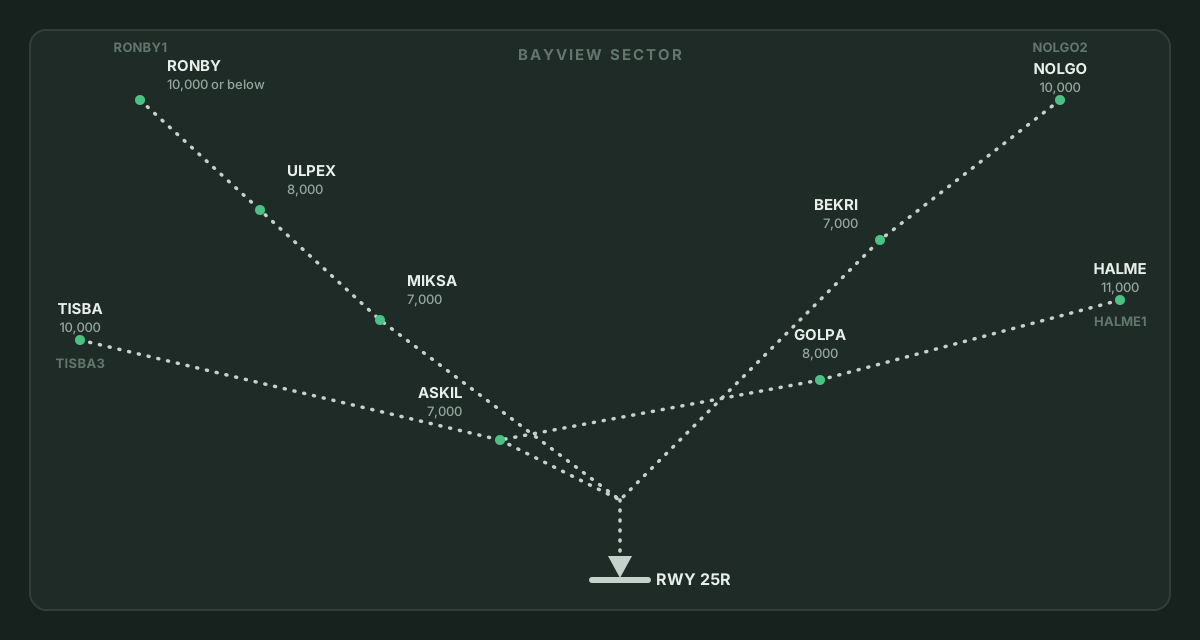
In ATC Simulator, Bayview has four STARs, all leading to runway two five right: RONBY one (RONBY, ULPEX, MIKSA), NOLGO two (NOLGO, BEKRI), TISBA three (TISBA, ASKIL), and HALME one (HALME, GOLPA, ASKIL). Each leg carries a published at-or-below altitude ceiling: on RONBY one, ten thousand at RONBY, eight thousand at ULPEX, and seven thousand at MIKSA; on NOLGO two, ten thousand at NOLGO and seven thousand at BEKRI; on TISBA three, ten thousand at TISBA and seven thousand at ASKIL; and on HALME one, eleven thousand at HALME, eight thousand at GOLPA, and seven thousand at ASKIL. The last fix of each STAR also carries a speed limit of two hundred thirty knots. None of Bayview's STARs publishes an at-or-above restriction or a descend-via profile.
The simulator flies the STAR for each aircraft. As an arrival passes a fix, the next fix's published altitude ceiling and speed become its targets. The simulator has no "descend via" instruction, so you assign altitudes with "descend and maintain". A published ceiling can lower an arrival's target only as far as the altitude you assigned, never below it. An altitude you assign also outranks the published ceilings when higher: an arrival told to climb and maintain twelve thousand feet stays at twelve thousand right through the STAR's lower ceilings of ten thousand, eight thousand, and seven thousand feet. In the same way, a controller-assigned speed outranks the published speed.
To shortcut an arrival, use the standard phrase "proceed direct RONBY" ("direct RONBY" is accepted, though non-standard). In the simulator, "proceed direct" replaces the rest of the route with that one fix, so later published altitudes and speeds no longer apply and you manage altitude yourself. An arrival that is never given an instruction flies its STAR to the last fix and enters a hold there. All four STARs end at a fix with a published hold (MIKSA, BEKRI, and ASKIL). You can issue a hold yourself with "hold at ASKIL as published"; only fixes that publish a hold accept it (RONBY, MIKSA, BEKRI, ASKIL, SOLAN, and KELVO do, while ULPEX, NOLGO, TISBA, HALME, and GOLPA do not).
Arrivals check in by voice on one two four point six with their STAR, altitude, and the ATIS letter from one two eight point six, or with "negative ATIS". "Expect ILS runway two five right approach" is the command the simulator accepts and the pilot reads back as approach information; it is not an approach clearance. On the scope, the selected aircraft's data block carries its clearance on the third line: its STAR identifier, followed by EXP ILS 25R when expecting an approach, CLR ILS 25R when cleared, VIS for a visual, or HOLD and the fix, with the origin and destination on the fourth line. As an optional beginner assist, the scope marks the initial approach fixes of the approach in use with a square labelled IAF, which for the ILS to runway two five right are SOLAN and BEKRI. Lesson 4, "Fixes and direct routing", practises proceeding direct and holding on the RONBY one and HALME one arrivals, and Lesson 5, "The arrival", has you work an arrival on the NOLGO two procedure.