Chapter 09
The Training Ladder
How the guided lessons and shift difficulty levels build your skills step by step from a single arrival on an empty scope to a full Bayview radar sector.
Why training moves in steps
The first eight chapters of this handbook laid out the approach job on paper: airspace and handoffs in chapter 1, the radar scope and radio phraseology in chapters 2 and 3, arrival procedures and vectoring in chapters 4 and 5, the final approach turn-on in chapter 6, separation minima and sequencing in chapter 7, and abnormal situations in chapter 8.
Reading the rules is only the first stage of learning air traffic control. In the United States, a new controller learns the rules in a classroom course, practises on simulated traffic, and then works live traffic at a facility under the eye of a certified instructor until certified on each position. Traffic is added in stages so the learner is never given a full sector first. Simulation exists for the same reason: you can make mistakes at a speed where each error is visible, and you can repeat the same situation until it stops being new.
The rules do not change between a quiet hour and a rush. Three miles laterally or one thousand feet vertically are required whether two aircraft are on the frequency or ten, and the words you speak to descend an arrival or transfer a flight to Bayview Tower stay the same at every traffic level.
American Two One Five, Bayview Approach, descend and maintain four thousand, turn left heading two eight zero.
Descend and maintain four thousand, left heading two eight zero, American Two One Five.
Delta Four Eight Two, contact Bayview Tower on one one eight point three.
One one eight point three, Delta Four Eight Two.
What changes is how many things happen at once. On an empty scope, you can watch American Two One Five finish its turn before thinking about the next call. When seven aircraft share the sector, you issue that turn, move your scan to Delta Four Eight Two approaching the final approach fix, and listen to both ReadbackThe pilot repeating a clearance or instruction back so the controller can verify it was received correctly.Open in the glossary while a new arrival checks in from Cascade Center.
The five rungs of the ladder
Every step of the radar course uses the same Bayview airspace, the same frequencies (124.60 for Bayview Approach and 118.30 for Bayview Tower), the same runway 25R and the same separation minima. Across the guided lessons and the ordinary shifts that follow them, the workload climbs through five rungs.
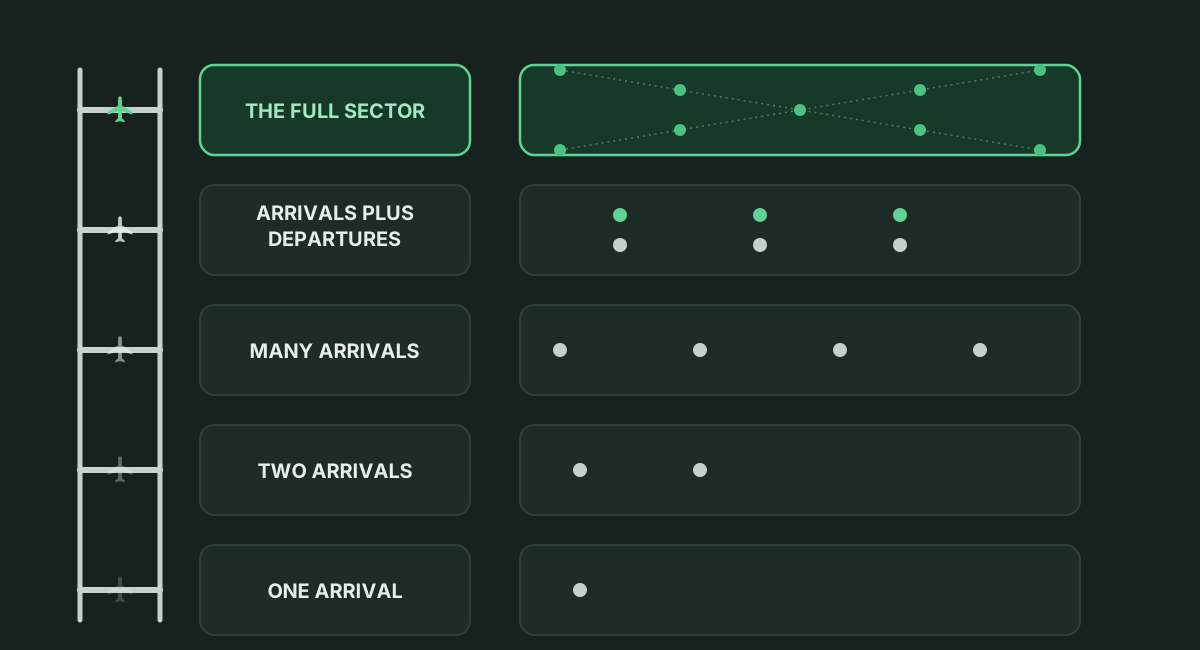
Before you step onto the first speaking rung, the opening lesson on the approach shelf, Reading the scope, shows two aircraft, one arrival and one departure, and asks for no radio call at all so you can read data blocks and tracks first.
One arrival: Most of the approach shelf sits on this bottom rung so you can practise each part of arrival control on a lone aircraft. Your first vector and Altitude and speed teach heading, altitude, and speed calls on one arrival with no other traffic. The arrival, The ILS, Vectors to final, and The full turn-on take one arrival from the Cascade Center handoff through the pattern, the localizer intercept, the ILS clearance, and the tower handoff. Two later lessons also use a single flight: The departure follows one climbing departure between Bayview Tower and Cascade Center, and Runway change gives you one arrival on a quiet morning.
Two arrivals: Adding a second flight divides your scan between two moving tracks. Fixes and direct routing places two arrivals on the scope while you issue waypoint shortcuts. At the end of the approach shelf, Your first emergency puts two arrivals on the downwind when one declares a medical emergency, requiring you to vector the second arrival out of the way and bring the priority flight in.
Many arrivals: The lesson Sequencing moves to the third rung with four arrivals to one runway. Every clearance is one you already used on a single flight, and the added task is building a line with turns and speed reductions so every pair keeps three miles or one thousand feet.
Arrivals plus departures: Mixing inbound descents with outbound climbs means managing two streams that cross through the same altitudes. You meet the outbound path by itself in The departure on the approach shelf, while on the tower shelf the lesson Both streams places four aircraft, two departures and two arrivals, on one runway. At the radar scope, an ordinary shift mixes departures in with the arrivals.
The full sector: No scripted lesson covers an open-ended rush. The top rung is the ordinary shift at Beginner, Advanced, and Expert difficulty, where up to four, seven, or ten aircraft share the approach frequency at once, new arrivals check in every one to four minutes, and departures and arrival sequences happen without a script, with readback errors at Advanced and Expert.
Inside a guided lesson
Every lesson in the Academy runs on a fixed, scripted set of aircraft at Bayview, whichever airport you have chosen for ordinary shifts, in clear weather with the wind from two five zero at about eight knots (the Runway change lesson then shifts the wind on a script). A lesson has no clock and no time limit, and no random traffic is added. It also runs at the easiest setting regardless of what you chose for shifts: pilots never misread a clearance, and a call may leave out the callsign when the lesson is clear about which aircraft is meant.
During a lesson, a mentor talks you through the scenario one step at a time on a lesson card. A step advances only when you do the thing it asks for. Each step can show the words to say as a written hint; that hint is only shown on screen and never spoken, so you have to say the phrase yourself. The lesson card can also open this handbook at the paragraph a step is practising so you can read the rule behind the clearance. Most chapters of this handbook carry a Fly it button on the page that starts the matching lesson, though chapter 9 has none because it covers the whole course.
You can fold the lesson card away so the scope is fully visible, skip one step at a time, skip the whole lesson, or end it early. A lesson is not saved while in progress, so if you leave a lesson halfway through, the only way to finish it is to start it again from the beginning.
Nothing in the Academy is locked. Any lesson can be started at any time, in any order, and repeated as often as you want. A finished lesson gets a DONE mark beside its name; those marks are only there so you can see where you have been.
The approach and tower shelves
The Academy holds 23 guided lessons on two shelves in one list: 12 for the approach radar seat and 11 for the tower seat. The room shows a count of lessons done out of the total and names the next unfinished lesson on the shelf for the seat currently chosen. At the end of a lesson, the debrief says what comes next on that shelf, or that you have completed the whole course.
In order, the approach shelf is: Reading the scope, Your first vector, Altitude and speed, Fixes and direct routing, The arrival, The ILS, Vectors to final, The full turn-on, The departure, Sequencing, Runway change, and Your first emergency. Together those 12 lessons practise the radar procedures from chapters 2 through 8.
In order, the tower shelf is: In the cab, Getting them airborne, Getting them down, Both streams, When the gap closes, On the ground, The ground combined, Turning the field around, Birds on the climb-out, Snow at Bayview, and Incidents on the frequency.
The next chapter, chapter 10, In the Cab, moves to the tower seat, and chapters 10 through 13 form the core tower half of this book. Because nothing is locked, you can fly the approach shelf and run your first radar shifts now, or continue into chapter 10 and work the tower shelf alongside them.
Your first shift and the three difficulty levels
Moving from the lessons to your first shift takes you from a fixed script to continuous traffic. On a fresh install, your first shift is not set to the approach seat: the stored defaults are Bayview, the tower seat, Beginner difficulty, and suggested-command hints turned on. The ready room lets you switch the seat to Approach before you launch your first shift on the scope.
A shift has no set length unless you choose one. It ends when you end it, when three separation violations or Runway incursionAnything on protected runway surface that should not be there: an aircraft past its hold line, a vehicle without approval. The accident category towers exist to prevent.Open in the glossary have been charged, or at a collision.
Outside the lessons, an ordinary shift has three difficulty levels: Beginner, Advanced, and Expert. Difficulty changes the workload and pilot error rates, never the rules; separation minima and scoring stay the same on all three levels.
Beginner: At the approach seat, the limit is 4 aircraft at once, with a new arrival about every 150 to 220 seconds; at the tower seat, the limit is 5 aircraft, with arrival gaps of 150 to 210 seconds. Pilots make no readback errors, and a call may leave out the callsign when only one aircraft is on the frequency. At the tower seat, a pilot who can see traffic on the runway they were just cleared onto notices it and refuses or goes around 80 percent of the time.
Advanced: At the approach seat, the limit is 7 aircraft at once, with a new arrival about every 100 to 170 seconds; at the tower seat, the limit is 7 aircraft, with arrival gaps of 110 to 150 seconds. Every call needs a callsign, and pilots misread a clearance two percent of the time. At the tower seat, a pilot cleared onto an occupied runway notices the traffic and refuses or goes around 55 percent of the time.
Expert: At the approach seat, the limit is 10 aircraft at once, with a new arrival about every 70 to 110 seconds; at the tower seat, the limit is 9 aircraft, with arrival gaps of 85 to 110 seconds. Every call needs a callsign, and pilots misread five percent of the time. At the tower seat, a pilot cleared onto an occupied runway notices the traffic and refuses or goes around 30 percent of the time.
In the Sim
In ATC Simulator, you know you are ready to move up a rung when you have spare attention left over on the current one. When you can complete the single-arrival lessons without reading the written hints on the lesson card, you are ready for two arrivals in Fixes and direct routing and four arrivals in Sequencing. Once you can space all four jets in Sequencing onto the final approach course without losing separation, you are ready for your first shift at Beginner difficulty.
At the end of every shift, the score sheet explains every score line in a plain sentence so you can see what worked and what slipped. For example, it awards +25 each time an arrival is handed to the tower established on its approach, +5 per transmission spoken in a standard form, and -100 for a separation violation, where three separation violations end the shift. When you can run a Beginner shift with suggested-command hints turned off, hand arrivals cleanly to Bayview Tower, and finish with zero separation violations, you are ready to step up to Advanced and then Expert.
In real-world operations, a developmental controller spends months moving from classroom study to radar lab simulation and live traffic under a certified instructor before working a position solo. ATC Simulator divides that progression into the 23 repeatable lessons, which run in clear weather with error-free pilot readbacks, and the three shift difficulty levels.