Chapter 02
The Language of the Sky
Learn how controllers measure and speak headings, speeds, and altitudes, and how to read radar targets, data blocks, and trails on the scope.
Headings and turns
Chapter 1 introduced the Approach seat and the chain of controllers that guide a flight from departure to touchdown, and chapter 3 covers how a radio transmission is built. Before you key the microphone, you need the numbers that go inside those transmissions and the radar picture they describe. Every vector, speed adjustment, and altitude assignment on the frequency corresponds to a measurement on your scope.
Direction in aviation is measured around a 360-degree circle referenced to magnetic north. Controllers and pilots speak every heading as three separate digits. Due east is heading zero nine zero, due south is one eight zero, due west is two seven zero, and due north is three six zero. North is spoken as three six zero; a heading is always one of 001 to 360. Headings below 100 degrees start with a leading zero, such as heading zero four zero.
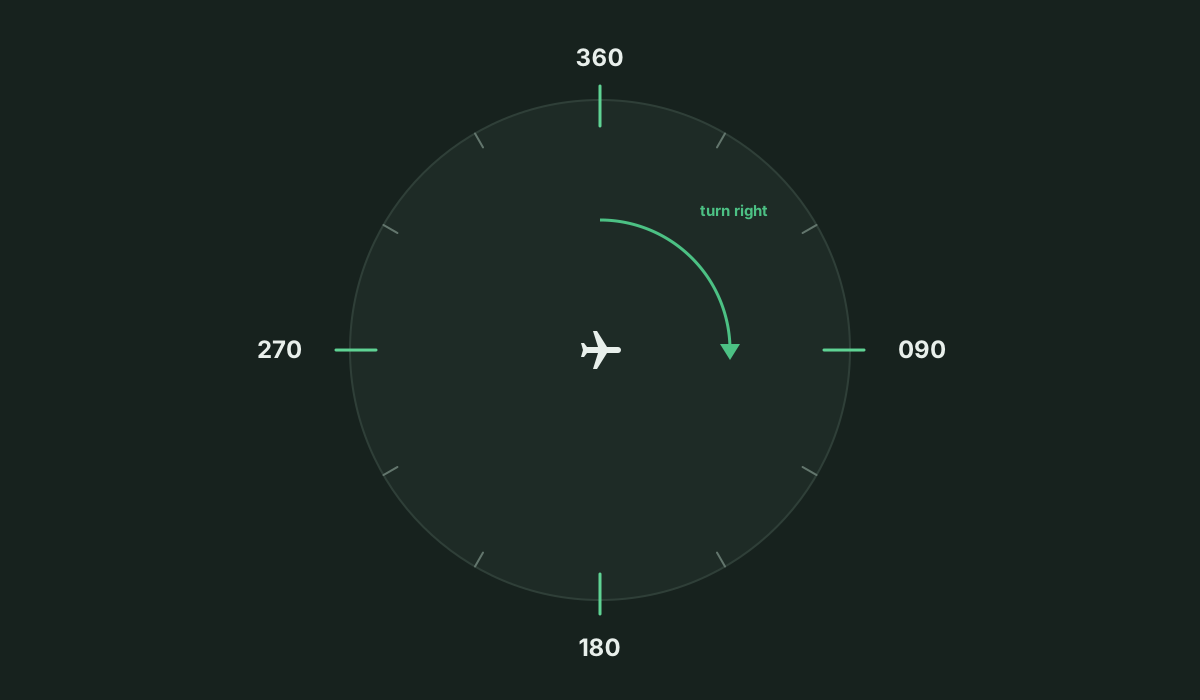
Opposite headings on the compass rose always differ by 180 degrees. You can find a reciprocal heading quickly by adding 200 and subtracting 20 when the starting heading is below 180, or subtracting 200 and adding 20 when it is 180 or higher; a result of 000 is spoken three six zero.
Heading is where the aircraft nose points, and track is where the aircraft goes over the ground. Wind makes them differ. When a crosswind blows from the south, a pilot flying east angles the nose slightly south of zero nine zero to keep the ground track straight east across your scope. Watching the ground track tells you when to adjust an assigned heading by five or ten degrees for drift.
A turn instruction names the direction of the turn before the three-digit magnetic heading, such as "turn left heading two four zero" or "turn right heading zero nine zero". Naming the direction ensures the pilot turns the way you intend instead of the long way around the compass. For a small adjustment, a relative turn gives the number of degrees, such as "turn twenty degrees right". In the simulator, a passenger jet turns at about three degrees per second and a HeavyUnited Four Heavy, Bayview Approach.A wake-turbulence class carried in the callsign of aircraft able to take off at 300,000 pounds or more, because the wake they leave behind is a hazard to whoever follows.Open in the glossary jet at about 2.2 degrees per second, so a 90-degree turn takes about thirty seconds.
United Three Three Two, turn right heading zero nine zero.
Turn right heading zero nine zero, United Three Three Two.
Speed and distance
Horizontal distance is measured in nautical miles, and speed is measured in knots, or nautical miles per hour. A nautical mile is about 6,076 feet, a little longer than a 5,280-foot statute mile. Dividing the speed in knots by sixty gives miles per minute: a target moving at 240 knots covers four miles a minute, and one at 180 knots covers three miles a minute.
Speed assignments are spoken as three digits followed by the word knots, as in "maintain two one zero knots". Controllers assign indicated airspeed, which is the dynamic air pressure read on the cockpit airspeed indicator.
Delta Four Eight Two, maintain two one zero knots.
Maintain two one zero knots, Delta Four Eight Two.
The radar scope shows ground speed, which is how fast the target moves over the ground. Two factors make ground speed differ from the indicated airspeed you assign. True airspeed rises with altitude as the air thins, so an aircraft flying 250 knots indicated at 10,000 feet moves through the air near 290 knots true airspeed. Wind then shifts the speed over the ground: with a tailwind ground speed is higher than indicated, and with a headwind it is lower.
Altitudes, flight levels, and airspace
Below 18,000 feet, altitudes are spoken in thousands and hundreds of feet above the local altimeter setting, such as "descend and maintain five thousand" or "descend and maintain four thousand five hundred". From 10,000 feet up, each digit of the thousands group is spoken separately, as in "descend and maintain one zero thousand". Pilots flying below 18,000 feet set their altimeters to the local barometric pressure so every aircraft in the terminal area shares the same height reference above terrain.
American Two One Five, turn left heading two four zero, descend and maintain four thousand five hundred, maintain one eight zero knots.
Left heading two four zero, descend and maintain four thousand five hundred, maintain one eight zero knots, American Two One Five.
At and above 18,000 feet in the United States, altitudes are flight levels: the altimeter is set to standard pressure 29.92 inches of mercury, and the altitude is spoken as "flight level" and three digits of hundreds of feet, so 35,000 feet is flight level three five zero. Where atmospheric pressure is low, the lowest usable flight level moves up so that aircraft at the bottom of the flight levels keep their vertical separation from aircraft below.
If a change in atmospheric pressure affects a usable flight level in your area of jurisdiction, use TBL 4-5-2 to determine the lowest usable flight level to clear aircraft at or above 18,000 feet MSL.
Under that FAA table, an altimeter setting of 29.92 inches or higher keeps flight level one eight zero usable, a setting from 29.91 down to 28.92 moves the lowest usable flight level up to flight level one nine zero, and a setting from 28.91 down to 27.92 moves it up to flight level two zero zero. Bayview's sector ceiling is 15,000 feet, so every altitude you assign is spoken in thousands and hundreds of feet.
Surrounding airspace is divided into classes A, B, C, D, E, and G according to traffic density and control rules. Controllers and pilots pronounce those classes using their ICAO phonetic letter names and can drop the word "Class".
A, B, C, D, E, and G airspace are pronounced in the ICAO phonetics for clarification. The term "Class" may be dropped when referring to airspace in pilot/controller communications.
An aircraft receiving permission to enter the busy airspace around a major terminal hears "cleared to enter Bravo airspace".
Targets and the data block
On the radar scope, each tracked aircraft appears as a computed position symbol called a target, placed at the aircraft's coordinates by the radar and transponder returns. Attached to the target is its data block, which carries the flight's identity, altitude, and speed information. When you need to pick one aircraft out of many on the display, you locate its callsign on the top line of the data block or select the target directly. Keeping that tag attached to the symbol lets you track dozens of flights simultaneously.
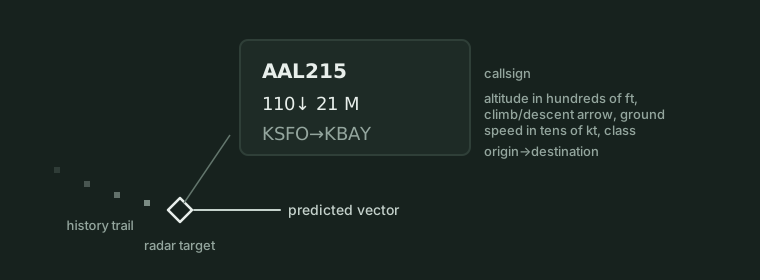
In the simulator, below the callsign, the data block prints altitude and ground speed in compact numerical form. Altitude appears as three digits in hundreds of feet, where 9,000 feet reads 090 and 4,500 feet reads 045. Ground speed appears as two digits in tens of knots, where 250 knots over the ground reads 25 and 180 knots reads 18. Because the radar system recalculates ground speed on every sweep and reads barometric altitude from the transponder, those digits update continuously as the aircraft manoeuvres.
Reading the scope
Reading the scope means judging the flight path, speed, and conflicts of every target at a glance. Two graphical cues attached to each target provide that picture immediately: the history trail behind the aircraft and the predicted vector ahead of it.
A target's history trail is a string of earlier positions left behind on recent radar sweeps. A straight history trail shows steady flight along a constant ground track, while a curved trail shows an aircraft in a turn. The spacing of the dots in the history trail shows speed visually across the sector. Closely spaced trail dots mark a slow aircraft, and widely spaced dots mark a fast one. When an arrival reduces speed for the approach, each new dot lands closer to the dot behind it.
Extending ahead of the target along its current ground track is the predicted vector, or velocity line. Because its length scales with ground speed, a long vector belongs to a fast aircraft and a short vector belongs to a slow aircraft. Comparing predicted vectors across the display reveals developing conflicts before the targets get close. Two targets at the same altitude whose predicted vectors end at the same point are on courses that will reach that spot together and require an instruction to keep them separated.
The map beneath the traffic
Behind the moving targets sits the video map of your airspace. The sector outline traces the lateral boundaries of the airspace you own, while range rings and a scale bar in nautical miles let you judge distances and spacing by eye. The map shows the active runways and the final approach courses leading to them.
Routes and procedures across the sector are built from fixes, which are named geographic points with five-letter pronounceable names such as RONBY, ULPEX, MIKSA, and NOLGO. The map also outlines minimum vectoring altitude areas, each labeled with the lowest altitude you may assign when vectoring an aircraft off a published route in that part of the sector. Staying at or above the charted minimum vectoring altitude keeps aircraft safely above terrain and obstacles.
In the Sim
In ATC Simulator, each aircraft target is drawn as a small diamond, a square turned 45 degrees, while fixes are drawn as small triangles with their names and, as an optional beginner assist, the initial approach fixes of the approach in use are drawn as squares marked IAF. Selecting an aircraft by clicking or tapping its target brings four corner brackets in around the diamond. At Bayview, the map displays an eight-sided sector outline with a ceiling of 15,000 feet, runways 25R and 33, minimum vectoring altitude areas with their floor altitudes, range rings, a scale bar in nautical miles, a compass, and the wind at the bottom left as direction and knots, for example 250 degrees at 8 knots.
A selected or large data block in the simulator carries four lines: line 1 shows the callsign along with the landing-sequence number, such as number two, when the aircraft has one; line 2 shows the altitude in hundreds of feet as three digits, an up or down arrow when the climb or descent is more than 300 feet a minute, the ground speed in tens of knots, and the aircraft class letter, so 9,000 feet at 250 knots ground speed reads 090 then 25; line 3 appears on the selected aircraft only and shows the clearance it is flying, such as its procedure, EXP ILS 25R, CLR ILS 25R, or HOLD with the fix; and the last line shows the origin and destination. Speed assignments in the simulator are indicated airspeed in knots while the data block shows ground speed. A crowded or narrow scope collapses blocks to one line showing the callsign and altitude with the arrow unless the aircraft is selected, transmitting, alerting, or an emergency.
Each aircraft trails a five-dot history trail with one dot dropped every four seconds of sim time and the oldest dot faintest, and its predicted vector shows one minute of travel at the current ground track and ground speed. A handed-off aircraft stays on the scope dimmed and its block ends with a "to Center" mark. Alert colours and block tags warn of hazards: an aircraft in a predicted conflict turns amber, one in a separation violation flashes red and amber, a low-altitude warning adds LOW to the block, an alerting aircraft off the edge of the view gets an arrow at the edge of the scope, an emergency adds EM, and a fuel state adds FUEL or MIN to the block. Lesson 1, "Reading the scope", is a no-radio lesson that has the student select two aircraft, American Two One Five on the RONBY one arrival and Southwest Eight Eight on departure, and read their blocks.